 Skip to content
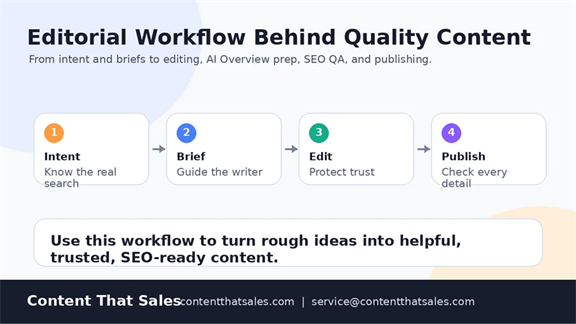
The editorial workflow behind quality content is the system that turns a rough idea into a useful page people can trust. It is not a fancy approval chain. It is a clear path for planning, writing, editing, checking facts, adding links, and publishing with confidence. When each step has a job, the final article feels calm, complete, and easy to use.
Most teams do not fail because they lack ideas. They fail because the idea moves from person to person with no shared standard. A writer guesses the angle. An editor fixes only grammar. Someone adds keywords late. Then the page goes live with gaps that were easy to prevent.
A strong workflow gives your team relief. It gives the reader a better answer. It also gives the brand a page that can rank, earn trust, and support sales without sounding forced. That is the real goal behind quality content.
What an Editorial Workflow Really Controls
An editorial workflow controls the full trip from topic idea to live page. It covers the goal, the reader, the brief, the outline, the draft, the edit, the SEO check, the images, the links, and the final review. Each part sounds simple by itself. Together, they decide whether the page feels useful or unfinished.
Think of it like a busy kitchen, but keep the idea practical. The reader only sees the finished plate. Your team sees the prep, timing, checks, and handoffs. If one step breaks, the final result still reaches the table, but something feels off.
Good content needs that same care. The workflow should answer who the page is for, what the page must solve, what proof it needs, and what action the reader should take next. It should also make quality easy to repeat. One lucky article is nice. A repeatable system is better.
For Content That Sales, the workflow matters because clients do not need random words. They need pages that show skill, earn trust, and help buyers move forward. That only happens when the process protects the reader from weak thinking.
Why Quality Content Needs a Real Process
Search is crowded now. AI tools made it easier to publish fast, but they also made weak content easier to spot. Readers can feel when a page was rushed. They notice vague claims, thin sections, repeated phrases, and answers that never fully land.
Google also pushes brands toward helpful, reliable, people-first content. That means the page should help real people first. It should answer the question, show care, use clear sources when needed, and avoid writing only for search engines.
A real workflow helps your team meet that bar. It slows the right parts down, so the rest can move faster. The brief reduces guessing. The outline prevents drift. The edit removes weak claims. The final check catches broken links, missing images, and awkward calls to action.
Without that process, content becomes a loose pile of decisions. With it, the team knows what good means before the draft starts. That small shift saves time, lowers stress, and creates work people feel proud to publish.
Start With Intent Before You Touch the Draft
The first step is not the title. It is search intent. What does the reader want when they type the query? Do they want a definition, a checklist, a guide, a comparison, or proof that a service can help them? That answer should shape the page before anyone writes a line.
For this topic, the reader wants to understand the process behind quality content. They may be a founder, marketer, editor, or agency owner. They are not looking for cute writing advice. They want to see how strong content gets planned, written, checked, and improved.
This is where what is SEO content writing and why it matters can support the bigger content plan. That guide helps connect search intent with real reader value. It also keeps SEO from turning into keyword counting, which rarely helps the buyer.
The team should check the search results before writing. Look at what types of pages rank. Notice the questions they answer. Then ask a sharper question. What can our page explain better, clearer, or with more trust? That question makes the content useful from the start.
Turn Research Into a Brief Writers Can Use
Research only helps when it becomes clear direction. A writer does not need a messy folder of notes. They need a brief that explains the reader, the goal, the angle, the must-cover points, the sources, the internal links, and the next step you want the reader to take.
A good brief should feel simple to use. It should not bury the writer under rules. It should show the path, define the guardrails, and leave room for the writer to think. If your team needs a practical model, the guide on how to brief a content writer gives this step a cleaner shape.
A strong topical map also helps here. It shows how this article connects to the wider content silo. That matters because one blog post should not carry the whole strategy by itself. Each page should support nearby pages and strengthen the topic as a whole.
The brief should also include what not to do. Do not repeat the same point in every section. Do not add claims without proof. Do not hide the real answer under a long warm-up. These small rules protect the final page from common problems.

Build an Outline That Works for Readers and AI Overview
The outline is where the workflow starts to show. A good outline helps readers scan the page and understand what comes next. It also helps search systems understand the topic, the subtopics, and the order of the answer.
For AI Overview, the outline should be plain and useful. Each H2 should answer a real part of the topic. Each H3 should support the H2, not repeat it. Clever labels may sound fun, but plain headings help both readers and machines understand the page faster.
A strong outline usually covers the main definition, the reason the topic matters, the step-by-step process, the quality checks, the mistakes to avoid, and the final action. For this article, that means covering briefs, outlines, drafting, editing, SEO, links, images, QA, AI Overview, and LLM visibility.
This is also the right time to plan examples. Examples stop the article from feeling like theory. They show the reader what the process looks like in real work. A workflow article should not float above the job. It should sit next to the team while they work.
Write the Draft With Proof, Flow, and a Clear Next Step
The draft should follow the outline, but it should not feel stiff. Good writing moves from one point to the next in a way that feels natural. The reader should never wonder why a section exists. Each part should earn its spot.
A useful draft answers the main question early, then adds depth. It should explain the process, show what each step controls, and connect the workflow to business outcomes. The reader wants relief, not homework. They want to know what to fix first and why it matters.
This is where a focused blog post writing service can help. The goal is not only to fill a page with words. The goal is to build a page that matches intent, carries a clear idea, and gives the reader a reason to trust the brand.
Writers should also avoid a perfect story arc when the topic does not need one. Real editorial work can be messy. Deadlines shift. Sources change. Drafts come back uneven. The workflow exists because content work is human, and humans need a smart system around them.
Use Editing to Fix Meaning Before Grammar
Editing should start with meaning. Does the page answer the search intent? Does each section add something new? Are the claims clear? Does the draft sound like the brand? Grammar matters, but it should not be the first and only layer of editing.
A meaning edit looks at the whole page. The editor checks the promise in the title, the first paragraph, the heading flow, the examples, the proof, and the CTA path. If the page says it will explain a workflow, the editor makes sure the full workflow is actually there.
After that, the editor can tighten the lines. Long sentences become clear. Repeated ideas get removed. Weak phrases get replaced with specific points. The goal is not to make the article sound fancy. The goal is to make the reader feel guided, not dragged.
This is the moment where trust grows. A careful edit tells the reader that someone respected their time. It also tells the client that the page was not treated like a quick task. It was treated like a business asset.
Add SEO Without Making the Page Feel Stuffed
SEO should support the content, not take over the page. The primary keyword should appear in the right places, but the writing still needs to sound natural. If the same phrase shows up too often, the reader feels it. Search engines can feel it too.
A better approach is topic coverage. Use the primary keyword where it matters. Then cover related questions, terms, and subtopics in a natural way. This helps the page feel complete without turning it into a list of repeated phrases.
The editor should check title tags, meta description, slug, H1, first paragraph, headings, image alt text, and internal links. These parts help search engines read the page. They also help people decide whether the page is worth their time.
As the old saying goes, haste makes waste. Rushing SEO at the end usually creates awkward writing. Building SEO into the brief, outline, and edit keeps the page smooth. It also keeps the team from fixing avoidable issues after publishing.
Prepare the Page for AI Overview and LLM Answers
AI Overview and LLM answers changed how content gets found. A page now needs to answer people and help machines understand the answer. That does not mean writing for robots. It means making the page clear, well-structured, and easy to trust.
Google gives site owners guidance on AI features and your website. The key idea for this workflow is simple. Keep building useful pages that search systems can access, understand, and show when they match the user need.
For LLM visibility, the draft should use clear definitions, direct answers, named steps, and careful claims. The page should avoid vague filler. It should also include real context, because AI answers often pull from pages that explain the topic in a clean and complete way.
Can a model understand the answer without guessing? Can a reader find the main point without digging? Those two questions help the editor check the page before it goes live. If the answer is no, the page needs another pass.

Check Trust Signals Before the Page Goes Live
Trust signals are not decoration. They help the reader decide whether to believe the page. In content work, trust often comes from clear wording, honest limits, useful examples, clean sources, a real brand voice, and a path to contact the team.
The editor should check whether the article makes claims it can support. If a claim needs proof, add a source or rewrite it. If a section sounds bigger than the evidence, bring it back down. Good content does not need to shout to sound strong.
The page should also show who can help. For Content That Sales, that means the brand name, service context, and contact details should feel easy to find. Readers should not need to hunt for the next step when they already feel ready.
Trust also comes from consistency. If the brand says it cares about quality, the page should look clean, read smoothly, and avoid broken links. Small mistakes make buyers pause. Clean checks help them move forward with confidence.
Handle Images, Links, and WordPress Formatting
Images should make the article easier to understand. They should not sit on the page just to fill space. For this topic, the best images show the workflow, the brief process, AI Overview structure, and the final QA checklist.
Each image needs useful alt text. The alt text should describe the image in plain words. It should not stuff keywords or repeat the title with no detail. Good alt text helps accessibility and gives search engines more context.
Internal links should guide readers to the next helpful page. External links should support important claims. Both should use anchor text that makes sense in the sentence. “Click here” is weak because it hides the reason for the link.
WordPress formatting also needs a check. Headings should follow a clean order. Paragraphs should be readable on mobile. Bullets should break down real lists, not replace every paragraph. The page should feel polished without feeling over-designed.
Use QA to Catch Problems Before Publishing
Quality assurance is the last shield before the page goes live. It catches problems that writing and editing may miss. This includes broken links, missing images, weak meta data, repeated headings, thin sections, spelling errors, and unclear calls to action.
A simple QA checklist works better than memory. The person checking the page should review SEO basics, readability, source links, internal links, image alt text, contact details, and mobile layout. They should also make sure the page matches the brief.
The QA pass should not become a full rewrite unless the page needs it. It should confirm that the work is ready for readers. If a major issue appears, the page goes back to the right step. That is not failure. That is the workflow doing its job.
This final pass gives the team pride. They know the page was checked before it reached the public. That feeling matters, because quality content is easier to stand behind when the process was real.
A good QA pass should also read the page like a buyer would. The reviewer should ask whether the article answers fast enough, explains the hard parts clearly, and gives the reader a next step that makes sense. This is where small wording choices matter. A page can pass every SEO check and still feel cold if the reader does not feel understood.
The final reviewer should also check for link balance. Too many links can distract the reader. Too few links can leave the page isolated. This version uses five internal links and two external links because each one has a clear job. That keeps the page useful without turning it into a link farm.
Set Roles So the Workflow Does Not Get Messy
A workflow works better when each person knows their role. The strategist owns intent, topic fit, and the content goal. The writer owns the draft and the reader flow. The editor owns clarity, structure, and trust. The SEO reviewer owns search details, links, and page elements.
When those roles blur, feedback gets messy fast. One person wants more keywords. Another wants a warmer tone. Someone else changes the angle late. The writer gets ten comments that point in different directions. That is how good drafts turn into slow projects.
The fix is simple. Name the owner for each stage before the draft begins. Decide who gives final feedback. Decide when feedback closes. This keeps the work moving and protects the writer from random last-minute changes.
Clients also benefit from clear roles. They know when to review the outline, when to review the draft, and what kind of feedback helps most. That builds trust because the process feels guided instead of chaotic.
This role clarity also protects the voice of the article. A page can lose its shape when too many people edit with different goals. One person should guard the reader experience from start to finish. That person makes sure the content still sounds human after every SEO, legal, client, or design note gets handled.

Review Results and Improve the Workflow Next Time
Publishing is not the finish line. It is the start of feedback. After the page goes live, the team should watch rankings, impressions, clicks, engagement, conversions, and sales support value. Not every page wins fast, but every page can teach something.
The review should ask what worked and what slowed the team down. Did the brief miss anything? Did the outline need more depth? Did the edit catch the right issues? Did the links help the reader move through the site? These answers improve the next article.
This is also where outsource content writing without losing quality becomes useful. A clear workflow lets outside writers work inside your standards. The brand keeps control, while the team gains more capacity.
Over time, the workflow becomes easier. The brief gets sharper. The outline gets faster. The editor knows what to watch. The QA list gets cleaner. Many drops make a river, and small process gains build a stronger content program.
Editorial Workflow Checklist for Quality Content
A checklist keeps the process practical. It helps the team move through the work without forgetting small steps. Use it before writing, during editing, and again before publishing. The point is not to slow the team down. The point is to reduce avoidable fixes.
- Confirm the primary keyword and search intent.
- Define the reader, pain point, and desired action.
- Build a brief with angle, sources, links, and must-cover points.
- Create an outline with clear H2 and H3 coverage.
- Answer the main question near the top.
- Add examples, proof, and useful details.
- Edit for meaning before grammar.
- Check SEO basics without stuffing keywords.
- Add only useful internal and external links.
- Review images, alt text, mobile flow, and CTA placement.
- Run a final QA pass before publishing.
- Track results and improve the process next time.
This checklist should stay flexible. Some articles need more research. Some need more source checks. Some need a heavier edit. The workflow should guide the team, not trap it. The best process gives structure and still leaves room for smart choices.
Common Workflow Mistakes That Lower Content Quality
The first mistake is starting with a title and hoping the rest works out. A title is useful, but intent comes first. If the team does not know what the reader wants, the article may sound polished while still missing the point.
The second mistake is treating the brief as a formality. A vague brief creates a vague draft. It also makes feedback harder because nobody knows what standard the draft missed. A clear brief saves the team from that awkward loop.
The third mistake is editing only the surface. Grammar fixes matter, but they cannot save weak thinking. If the structure, proof, or answer is thin, the page needs a deeper edit. A clean sentence still fails if it says too little.
The fourth mistake is adding links after the article is done. Links should support the reader journey. If they get added at the end with no plan, they often feel random. A better workflow plans links during the brief and reviews them during QA.
The fifth mistake is skipping the post-publish review. Teams publish and move on, then repeat the same gaps next month. Results should feed the workflow. That is how a content system becomes smarter instead of just busier.
How Content That Sales Uses This Workflow
Content That Sales uses this kind of workflow to keep content useful, clear, and tied to search demand. The work starts with intent and planning. Then it moves through briefing, outlining, writing, editing, SEO checks, link checks, and final QA.
The point is not to make content feel heavy. The point is to make quality easier to repeat. When the system is clear, writers can write better. Editors can give sharper feedback. Clients can review with less stress. Readers get a better page.
This also helps teams feel a sense of belonging. Everyone understands the standard. Everyone knows where their part fits. That makes the work feel less random and more professional, even when the deadline is tight.
Need help building content that feels planned, useful, and ready to publish? Contact Content That Sales at 8801631988589 or service@contentthatsales.com. The right workflow can turn a simple article into a page that works harder.
FAQs About the Editorial Workflow Behind Quality Content
What is the editorial workflow behind quality content?
The editorial workflow behind quality content is the process used to plan, write, edit, check, and publish content that helps readers. It includes search intent, content briefs, outlines, drafting, editing, SEO checks, link checks, image checks, and final QA.
Why does an editorial workflow matter for SEO?
An editorial workflow matters for SEO because it keeps the page focused on intent, structure, useful answers, and trust. It also helps teams add keywords, links, headings, and meta data in a natural way instead of forcing them later.
How does a workflow help with AI Overview and LLM visibility?
A workflow helps by making the content clear, structured, and easy to understand. AI systems need direct answers, useful headings, complete context, and trustworthy claims. A strong workflow builds those parts before the page goes live.
What should happen before a writer starts the draft?
The team should confirm search intent, audience, angle, sources, internal links, external proof, heading plan, and conversion goal. This creates a brief the writer can follow without guessing.
How many editing stages does quality content need?
Most quality content needs at least two editing stages. The first edit checks meaning, structure, and proof. The second edit checks clarity, grammar, formatting, SEO basics, and final polish before publishing.